bizSAFE

bizSAFE Portal 

1. What does the new bizSAFE Portal offer?

The new bizSAFE Portal will make it easier for you to:•

  • Submit bizSAFE applications;
  • Check your company’s bizSAFE status, and view other companies’ bizSAFE status when searching for a business partner or contractor; 
  • Download your bizSAFE certificate and logo; 
  • Update your contact details; and
  • Access previous submissions.

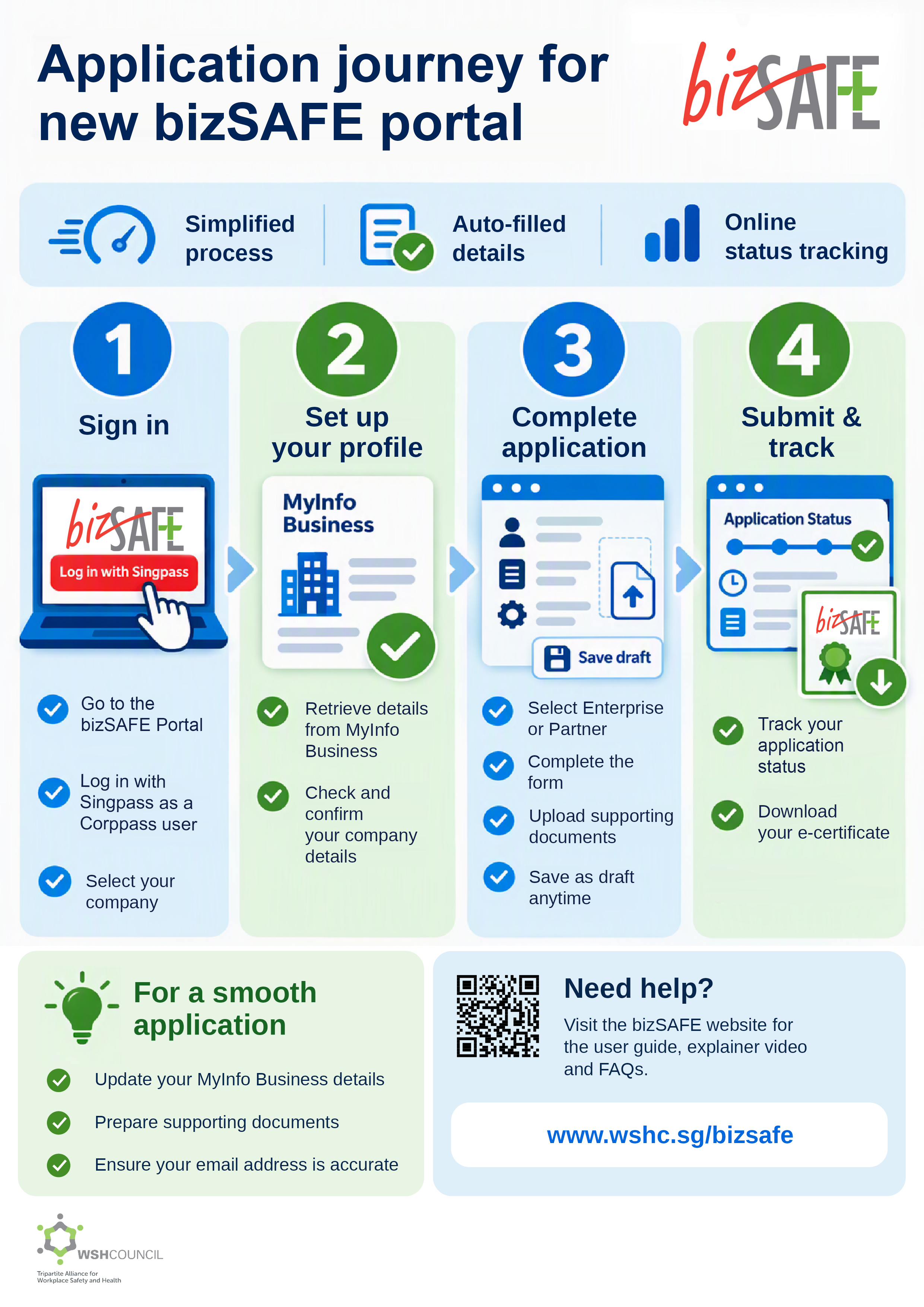
Company particulars will also be pre-filled based on information from the Accounting and Corporate Regulatory Authority (ACRA), simplifying the application process.

2. When does the new bizSAFE Portal take effect?


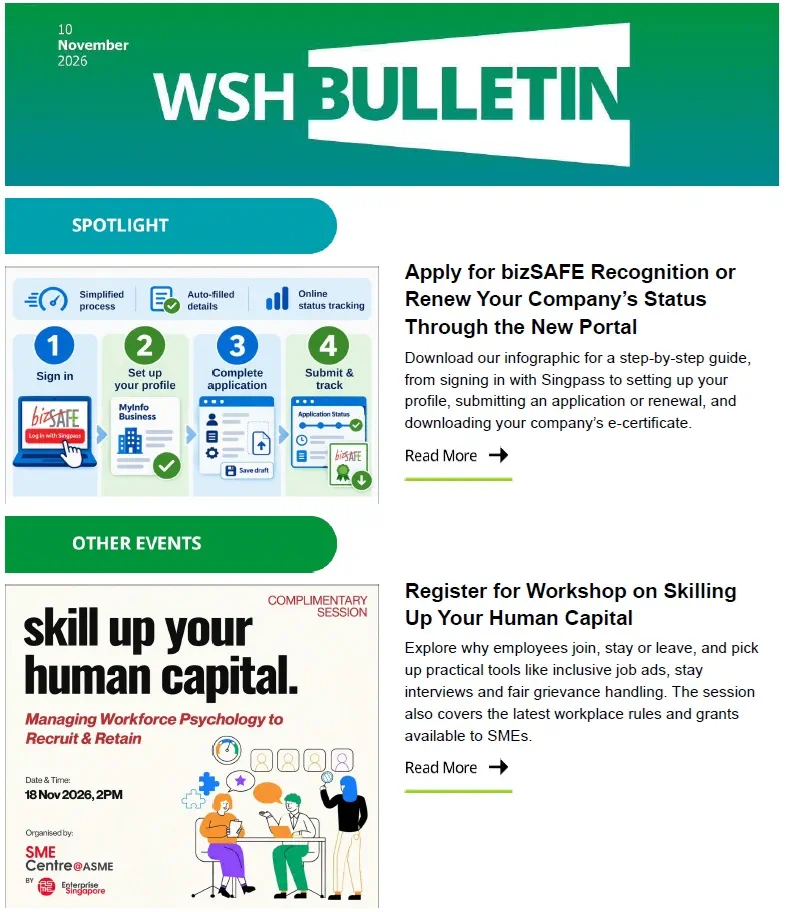
From 2 November 2026, all bizSAFE applications must be submitted through the bizSAFE Portal. Applicants will need to log in using Singpass with the appropriate Corppass authorisation to apply on behalf of their company. 

3. How do I access or log in to the new bizSAFE Portal?

You may access the bizSAFE Portal on the WSH Council website. Log in with Singpass as a Corppass user. Corppass Administrators may refer to Corppass authorisation application guide to grant and manage employees’ authorisations. 

When creating an account for the first time, log in with your Singpass and authenticate through Corppass, then consent to MyInfo Business to retrieve your company information.

4. Will my existing bizSAFE records and recognition carry over to the new bizSAFE Portal, or do I need to reapply? 

Your existing company details and records will be migrated to the new bizSAFE Portal. 

You do not need to reapply, and your current bizSAFE recognition remains valid until it expires. To download your company’s bizSAFE e-certificate or logo, or update your company’s details, log in to the bizSAFE Portal.

5. I submitted my application before 2 November 2026, i.e. before the launch of the new bizSAFE Portal. How can I check its status in the new bizSAFE Portal?

You can check your company’s bizSAFE recognition status using the “bizSAFE status check” feature, without logging in to the Portal. If you are unable to find your company’s status or confirm whether your application has been registered in the new portal, please submit an enquiry through our “Contact Us” page.

6. Where can I find guidance on using the new bizSAFE Portal?
You may refer to the user guide on how to use the new bizSAFE Portal. If you encounter an issue which is not covered in the guide, please submit an enquiry through our “Contact Us” page. You will receive a response within three working days, or longer if the issue is complex. 

Corppass/Singpass access to the bizSAFE Portal

7. I do not know who my company's Corppass Administrator is. What should I do?

In the Corppass portal, go to Services > Find your Corppass Admin.

8. When I use my Singpass to log in to Corppass, can the WSH Council view my personal information?

No, we can only view the information provided in your bizSAFE application. 

9. How long does it take for the Corppass Administrator to authorise the bizSAFE Portal access for me?

As this pertains to your company’s internal communications, please check directly with your company’s Corppass Administrator.

10. How do I change or remove access to the bizSAFE Portal?

Please ask your company’s Corppass Administrator to change or remove your access through the Corppass portal. 


About bizSAFE

How can I start improving workplace safety and health (WSH) in my company and embark on the bizSAFE journey?

If your company is a small- and medium-sized enterprise (SME), the START Your Safety and Health @ Work guide offers practical guidance to help you get started. 

Learn more about the bizSAFE Programme and the requirements for each level. Applications can be submitted online. 

To support your application, we recommend that the relevant employees attend these WSH courses:

• bizSAFE Level 1: The CEO or a Board Director attends the Top Executive WSH Programme.
• bizSAFE Level 2: An RM Champion attends the Workplace Safety and Health Control Measures Course.
What documents are required to apply for bizSAFE recognition?

bizSAFE has five levels, but your company may apply directly for any level if it meets that level’s requirements.

Refer to the list of supporting documents required for each bizSAFE level.

My company's Senior Management has already attended the bizSAFE Level 1 Workshop for CEOs/ Top Management. Does he/ she need to attend the new Top Executive WSH Programme (TEWP)?

Yes. The bizSAFE Level 1 Workshop is different from the TEWP, so attending the former does not meet the TEWP requirement. Companies in the Construction, Manufacturing, Marine, or Transportation & Storage industries must ensure that at least one top executive, such as the CEO or a Board Director responsible for WSH, completes the TEWP. The requirement also applies to companies that employ work pass holders under the Construction, Manufacturing, Marine or Process sectors, whether or not they are applying for bizSAFE recognition.

You may wish to refer to the FAQs about the Top Executive WSH Programme (TEWP).

My company has attained certification in SS651/ ISO 45001. Why is there still a need to submit a Risk Management (RM) Implementation Audit Report to apply for bizSAFE Level STAR?

The Risk Management Implementation Audit focuses on meeting the requirements in the Code of Practice on WSH Risk Management (RMCP), which also addresses risks related to terrorism, disease outbreaks and mental health.

My company has been placed on the Business under Surveillance Programme. How do I reinstate my bizSAFE status?

To reinstate and renew your company's bizSAFE status, please contact us and provide the following once your company has exited the programme:

• Exit Notification letter issued by the Ministry of Manpower (MOM); and
• Latest Risk Management Audit Report issued by an Auditing Organisation (AO) that is registered with MOM to provide WSH Auditing Services.


Apply for bizSAFE

How do I renew the bizSAFE recognition for my company?

bizSAFE Levels 1 and 2 are introductory levels to the bizSAFE Programme. The bizSAFE certificates for Levels 1 and 2 are valid for a period of 6 months from the date of approval and are non-renewable once they expire.

We encourage companies to progress to bizSAFE Level 3 and above, which recognises companies that have conducted workplace risk assessments, in accordance with the WSH (Risk Management) Regulations.

To renew your company's bizSAFE recognition for Level 3 and above, please submit an online renewal application two months before the expiry date via the bizSAFE Portal. An automated acknowledgement email will be sent to your company’s contact person and senior management representative.

What are the fees and costs involved to get bizSAFE recognition?

It is free to apply for bizSAFE recognition. However, your company may incur costs for the relevant bizSAFE training and courses and for engaging an auditor to conduct the Risk Management Implementation Audit.

• To schedule a workshop or course that suits your convenience, please refer to the bizSAFE courses listed in MySkillsFuture.

• Please engage an Auditing Organisation (AO) that is registered with the Ministry of Manpower to provide WSH Auditing Services.

I have just submitted my bizSAFE application to WSH Council. How long does it take to process the bizSAFE application?

We will process your bizSAFE application within 10 working days of submission and will contact your company should any additional information or documents be required. 

Once your application is approved, an email will be sent to your company's senior management representative from notification-bizSAFE@tal.sg. To receive our notifications promptly, please add this address to your "safe senders" list. If you do not receive any notification within 10 working days, please check your junk mail folder. 

You can also log in to the bizSAFE Portal to check your application status. Once your application is approved, you can update your contact particulars or download the bizSAFE e-certificate and logo.

Can I apply for bizSAFE if my company is not a locally-registered business?

Yes, the same requirements apply. Please engage an Auditing Organisation (AO) that is registered with the Ministry of Manpower to provide WSH Auditing Services to conduct the bizSAFE Level 3 Risk Management Implementation Audit at your overseas workplace or site office.

Please also refer to the Corppass/ Singpass FAQ section, particularly the instructions for registering a Corppass account for a foreign company. 

Do I need to engage a consultant to apply for bizSAFE for my company?

No, your company does not need to engage a consultant to submit a bizSAFE application. Companies are strongly encouraged to submit their applications directly to minimise the risk of fraud or forgery from granting external parties, such as consultants, access to the bizSAFE Portal.

To submit an application, your company must authorise an employee through Corppass to access the bizSAFE Portal. Please refer to the Corppass authorisation application guide for instructions.

My company has just submitted an application for bizSAFE. Why do I receive a notification from WSH Council for a verification inspection?

Verification onsite inspections are a routine part of the bizSAFE application process and are done on a random sampling basis.  

bizSAFE applicants should be prepared to show that they have conducted a proper risk assessment, implemented effective control measures and engaged a responsible AO to conduct the audit.  


bizSAFE Status Check

How do I check my company’s bizSAFE status or expiry date?

Besides the details stated in your bizSAFE e-certificate, you can check your organisation or other organisations’ bizSAFE status, including bizSAFE level, status and expiry date via the bizSAFE Portal, under bizSAFE Status Check. For renewal instructions, please refer to Q6 of the FAQs.  

The validity of each bizSAFE level is as follows:

bizSAFE

Validity from date of approval

Level 1

6 months

Level 2

6 months

Level 3

3 years*

Level 4

3 years*

bizSAFE STAR

3 years*

* Valid for 3 years or upon expiry of the relevant external certifications (SCAL-SLOTS, JCI, Responsible Care, ISO 45001, SS 651), whichever is earlier.


How do I update bizSAFE records if there are changes to my company’s particulars/personnel?

Please log in to the bizSAFE Portal to update:

• senior management’s particulars; and
• contact person’s particulars.

Your company name and Unique Entity Number (UEN) are linked to MyInfo Business. Please contact the Accounting and Corporate Regulatory Authority (ACRA) directly to resolve any discrepancies. 

For SGSecure Representative, please update it through the SGSecure website.

How can I obtain a copy of my company’s bizSAFE certificate?

Please log in to the bizSAFE Portal to retrieve:

• bizSAFE logo (only for bizSAFE Level 3 and above)
• bizSAFE e-certificate (for certificates that have expired or will expire within two months, only the certificate number will be provided)

Can I print the bizSAFE logo on my company name card? 

The bizSAFE logo is a registered trademark. Only companies that have been awarded bizSAFE status by the WSH Council are recognised as bizSAFE Enterprises and may  use the bizSAFE logo on their collaterals, such as name cards, brochures and posters. bizSAFE Enterprises may use only the logo that corresponds to the bizSAFE level they have attained.

The bizSAFE logo communication guide helps bizSAFE Enterprises by clearly defining the parameters for using the bizSAFE logo in communications applications. The WSH Council will take action against enterprises that misuse the bizSAFE logo.

I have already attended the bizSAFE course, but I cannot find my company’s name in the bizSAFE listing? 

Attending bizSAFE courses does not automatically grant your company bizSAFE recognition. Your company must submit an application with the required supporting documents to the WSH Council.

To apply for bizSAFE recognition, please submit your application via the bizSAFE Portal and attach the required documents. 

Where can I obtain a copy of the certificates of the bizSAFE training/courses I had attended?

The WSH Council administers the bizSAFE Programme and issues recognition to companies for their workplace safety and health capabilities. To obtain bizSAFE training and course certificates that were issued to individuals who have attended bizSAFE courses, contact your training provider or download them from MySkillsFuture.


bizSAFE Marketplace

What is bizSAFE Marketplace?

The bizSAFE Marketplace lists bizSAFE Enterprises by the goods or services they offer. It allows potential service buyers to search for a business partner or contractor with the risk management capabilities to take on a project. You may access the bizSAFE Marketplace from the bizSAFE Portal.

Do I need to log in to view the bizSAFE Marketplace or check bizSAFE status?

No. The bizSAFE Marketplace and the bizSAFE status check feature on the bizSAFE Portal can be accessed without logging in and let you view the recognition status of companies.


bizSAFE Partner

What is the difference between a bizSAFE Partner and bizSAFE Enterprise?  


bizSAFE Enterprises are companies that have achieved bizSAFE recognition through the bizSAFE Programme (i.e. bizSAFE Levels 1 to 4, and bizSAFE STAR).

A bizSAFE Partner is carefully selected and recognised as an organisation that can influence stakeholders across its value chain to work safely.